Truck Driver Resume Templates
The template question comes up because most resume templates online are designed for office jobs — marketing managers, designers, analysts. They lean on visual hierarchy, sidebars and color blocking. None of that helps a driver, and some of it actively hurts.
What works for a truck driver resume is a plain document that puts the license, the equipment and the route experience where a recruiter can see them in one scroll, and that survives being fed through hiring software.
All four templates here follow that rule. They differ in density and tone, not in structure.
Last reviewed
Choose a template and start building
Free preview • $9.99 one time — no subscription, no auto-renew • ready in 3–5 minutes
Genuine problem with your document? We fix it or refund it.
Who these templates are for
- Local and delivery drivers applying to distributors and retailers
- OTR and regional drivers applying to carriers
- Drivers with 10+ years of employment history to document
- Drivers who need both a printable and an uploadable version
How each template handles your CDL block
- Every template keeps CDL class and endorsements in a dedicated block near the top.
- Date ranges are right-aligned with tab stops rather than tables, so they parse cleanly.
- Section headings use standard names — Professional Experience, Education, Certifications — which is what parsers look for.
Equipment these templates give room for
- Equipment appears within each job entry as well as in the skills block
- That repetition is deliberate: it helps keyword matching without padding
Skills sections these templates support
Only include the ones that are genuinely true of you.
- Two-column skill lists in Classic, Modern and Experienced
- Inline comma list in ATS Minimal for maximum parser safety
Certifications and endorsements
- Plain bulleted certification list in all four templates
The four layouts, side by side
All four are single column with real text — no photos, no columns, no rating bars, nothing that scrambles in applicant tracking software. They differ in typeface, spacing, header placement and how much history fits on a page.
-
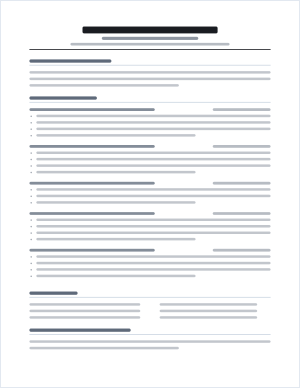
Classic CDL
Serif, centered name, ruled section headings. The layout most driver recruiters expect to see.
-
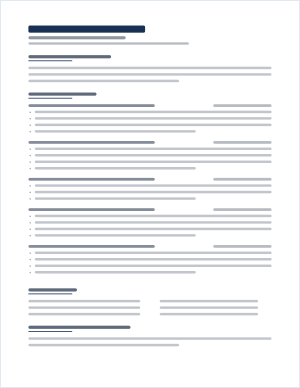
Modern Driver
Sans-serif, name on the left, short navy accent rule under each heading.
-
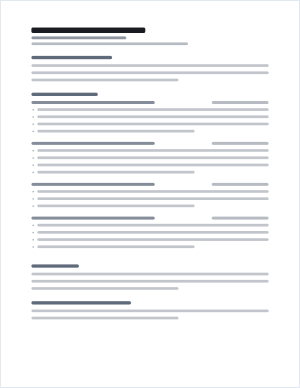
ATS Minimal
No rules, no columns anywhere, plain headings and a wrapped skills list. Maximum parser safety.
-
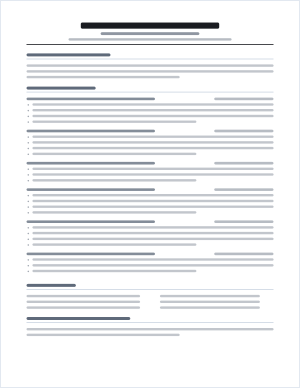
Experienced Driver
Tighter spacing and smaller type so a long work history still reads well.
Previews show layout, not content. Your own resume is built from your answers, and you can switch template at any point before you download.
Download a sample resume
Free PDFs, no email required. These are produced by the same builder that writes your resume, so the layout and structure are exactly what you would get.
- Entry-level CDL resume sample (PDF) A one-page Class A resume for a driver with a new licence and no commercial driving history — CDL and training above the work history, with non-driving jobs presented honestly.
- Experienced CDL resume sample (PDF) A Class A resume for a driver with ten years across OTR, regional and tanker work, laid out so a long employment history still fits on one page.
The drivers in these samples are fictional. Use the structure, then put your own verifiable history into it — never submit someone else’s history as your own.
Example wording inside the template
About the examples on this page: every example is written by us as an illustration. None describes a real driver or a real customer, and no figure in any example is real. Use the structure, never the content.
Template choice does not change the words. It changes the typeface, spacing, rules and how much fits per page.
Classic CDL: Times-based serif, centered name, full-width section rules.
Modern Driver: sans-serif, left-aligned name, short accent rule under each heading.
ATS Minimal: sans-serif, no rules at all, wider line spacing.
Experienced Driver: sans-serif, tighter leading, smaller margins, centered name.
Choose a template and start building
Free preview • No credit card required
Template mistakes that break in ATS software
Sending a scanned or photographed resume
An image of a resume contains no text. Parsers get nothing, and some portals reject the file outright. Always send the PDF or DOCX.
Renaming the file "resume.pdf"
Recruiters download dozens of these. Use your name: "John-Smith-Resume.pdf". These templates name the file that way automatically.
Mixing fonts
One typeface family per document. Every template here enforces that.
Frequently asked questions
Do I get both PDF and Word?
Yes, on every paid package. Use the PDF for uploads and email, and keep the DOCX so you can adjust it for a specific posting later.
Can I print these?
Yes. All four are US Letter with proper margins and page breaks, so they print cleanly and can be handed to a recruiter in person.
Will a two-page resume hurt me?
Not for an experienced driver. DOT verification covers ten years, and recruiters expect to see it. Keep it to two pages maximum.
Sources
- FMCSA — Commercial Driver’s License The federal overview of CDL requirements and how licensing is split between FMCSA and the states.
- 49 CFR 383.91 — Commercial motor vehicle groups The legal definitions of Class A, Class B and Class C.
Related guides
Ready to put this on paper?
Answer a few questions and see your finished resume before you pay anything.
Free preview • No credit card required